For parents
Know where your child is on the way to school.
See the van on a map during the trip, get an alert at pickup and drop-off, and manage all your children from one app.
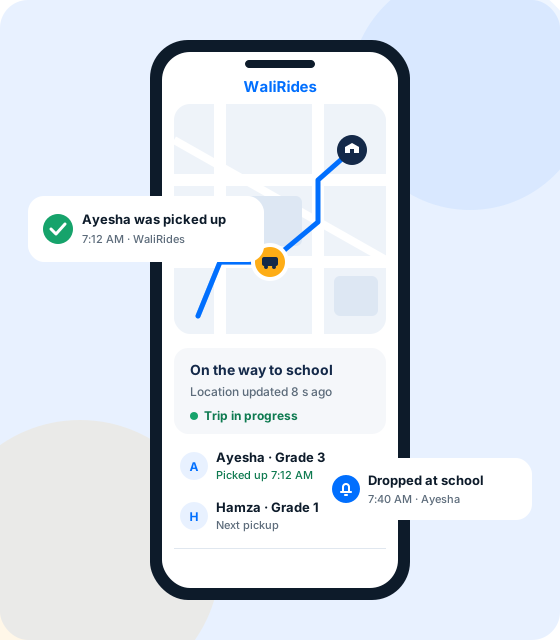
The parent app
Everything about the school run, in your pocket

The van on a map
Follow the trip on a map. The position updates about every 10 seconds while the trip is running.

Pickup and drop-off alerts
Get a notification when your child is picked up and when they are dropped off, and when a driver accepts your request.

All your children in one place
Add each child with their school and grade, and manage their rides from one account.

Mark a day off
Child unwell or on holiday? Mark the day off, and the driver and the school can see it.

Trip history
Look back at past trips with their pickup and drop-off times.

Drivers checked first
Drivers are approved only after our team has reviewed their documents.
How it works
From sign-up to the school gate in three steps
1
Add your children
Create your account in the WaliRides app and add each child with their school and grade.
2
Request a driver
Send a request to a driver for the dates you need. When the driver accepts, the to-school and to-home trips are set up.
3
Follow every trip
See the van on the map while the trip runs, and get an alert when your child is picked up and dropped off.
An example morning
What a school day looks like with WaliRides
Times are an example; your route sets the real ones.
1
7:05 · Trip starts
The driver starts the to-school trip. You can follow the van on the map.
2
7:12 · Picked up
The driver marks your child as picked up, and you get an alert.
3
7:40 · At school
Dropped off at school: you get an alert, and the school sees it on its dashboard.
4
Afternoon · Home trip
The same on the way home, until your child is dropped at your door.
FAQ
Questions parents ask
Is the location live?
During a trip, the van’s position updates about every 10 seconds.
Do I have to share my own location?
No. The app shows the driver’s location during a trip. It does not track you.
Can I add more than one child?
Yes. Add each child with their school and grade, and follow each of their trips.
What if my child is not going to school one day?
Mark a day off in the app. The driver and the school can see it.
Who can see my child’s details?
Your child’s driver, their school and the WaliRides operations team, only to run the service. See our privacy policy.
How do I get the app?
The app is not on Google Play or the App Store yet. We are onboarding families directly: request access and we will get in touch.
Ready for calmer school mornings?
Tell us your child’s school and area, and we will get in touch about joining WaliRides.